Spec-Driven Development and the Folder Architecture That Makes It Work
You open a chat, describe what you want, and get code back that looks right, until it doesn't. The stack is wrong. The edge cases are missing. The auth module doesn't match the patterns in the rest of your codebase. You correct, re-prompt, correct again, and eventually the context window degrades to the point where you're fighting the AI more than collaborating with it. Most AI-assisted development fails this same way.
The AI can code. What is missing is the structure around it.
I wrote recently about Doug Kerwin's Enterprise Vibe Coding Playbook and his central argument: AI should write most of your code, but you must remain the architect, reviewer, and course-corrector. Design before you dive in. Think before you prompt. That's the philosophy. This piece is about the methodology and infrastructure that make it operational: spec-driven development and structured folder architecture for AI agents.
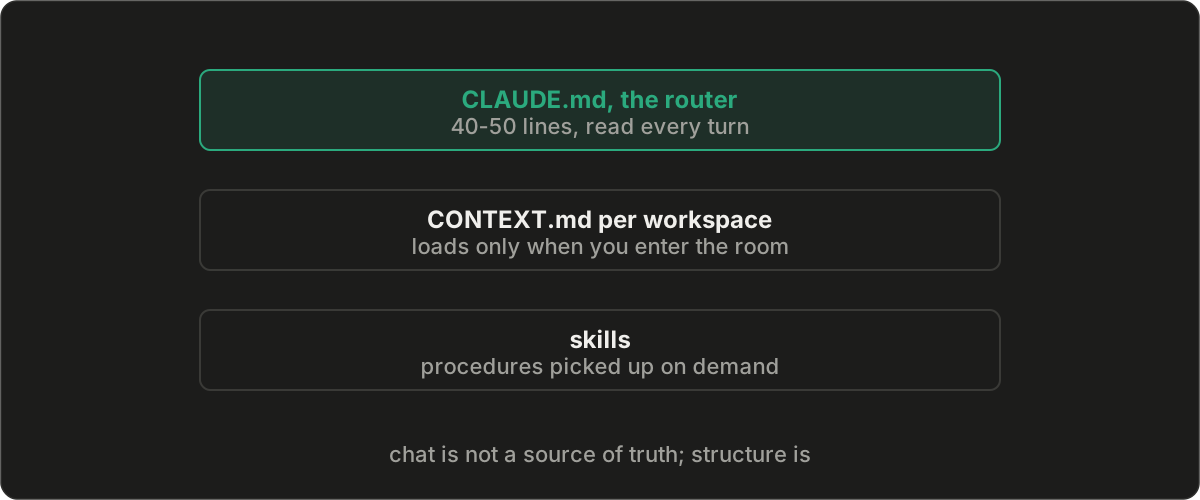
The Problem: Chat as Source of Truth#
When you let an AI jump straight to code, you're asking it to figure out what to build, how to build it, and actually build it, all in one context window. That's three jobs. It does a mediocre version of all three instead of a good version of any one.
Worse, the design decisions live in chat history. Close the session, and they're gone. Start a new conversation, and the AI re-derives context from code that may not reflect the original intent, or it hallucates conventions that contradict decisions you made last week. For quick prototypes, this is fine. For anything you have to maintain, it's a liability.
The GitHub Engineering blog put it well: "We treat coding agents like search engines when we should be treating them more like literal-minded pair programmers. They excel at pattern recognition but still need unambiguous instructions."
Spec-driven development is how you give those unambiguous instructions.
The Methodology: Specs as Source of Truth#
The core idea is straightforward: before the AI writes a line of code, you write a specification, a persistent markdown file that captures what you're building, why, the design decisions, API contracts, edge cases, and a decomposed task list. The spec becomes the source of truth, a version-controlled file rather than a decision buried in chat history you will close and lose.
GitHub recently open-sourced Spec Kit, a toolkit that formalizes this into four phases:
Specify: Describe requirements as user journeys and success criteria. Focus on what and why, not technology choices. Who uses this? What outcomes matter? What does success look like? This is the "hard thinking" that Kerwin insists on, externalized into an artifact instead of locked in your head.
Plan: Add architecture constraints, stack preferences, and non-functional requirements. If your company standardizes on certain technologies, if you're integrating with legacy systems, if you have compliance or performance targets, all of that goes here. The AI designs within your constraints instead of guessing at them.
Tasks: Decompose the plan into small, reviewable, testable units. Each task is concrete and independently verifiable: "create a user registration endpoint that validates email format," not "build the auth system." This is test-driven development applied to the planning layer.
Implement: Execute tasks sequentially with focused review at each step. Instead of reviewing thousand-line code dumps, you review focused changes that solve specific problems.
The insight is that each phase has a specific job, and you don't move to the next one until the current phase is fully validated. The spec captures intent. The plan captures constraints. The tasks capture scope. The implementation follows all three.
In Practice: A Four-Phase Workflow#
Practitioners like Ghazi Ahmed have adapted this into a hands-on workflow specifically for Claude Code that's worth studying:
Phase 1: Explore. Before the AI writes a single line, it reads. You're explicit about this: "Read the auth module, user model, and existing middleware. Understand the patterns. Do NOT write code." Without that last line, the AI will start drafting implementations mid-research. You don't want that yet.
Phase 2: Write the spec. Draft a three-layer specification: Requirements (the what and why: problem statement, goals, acceptance criteria, constraints), Design (the how: architecture decisions, data model changes, API contracts with actual request/response examples, edge cases), and Tasks (the implementation plan: small, atomic steps, each touching three files or fewer, with explicit dependencies and definitions of done). Save it as docs/spec-feature-name.md in your repo.
Phase 3: Implement with subagents. Delegate each task to a subagent so it gets a fresh context window scoped to just its slice of work. The orchestrator tracks progress without filling up on implementation details. Each subagent produces one commit. If Task 4 breaks something Task 2 built, the git history tells you exactly where to look.
Phase 4: Verify. Tests are inline with tasks, not a separate phase tacked on at the end. Every task compiles and passes tests before the next one starts. For bugs, the loop is strict TDD: write a failing test, confirm it fails, fix the code, confirm it passes.
The key discipline: the spec file is your recovery point. Context degrades. It always does. When it happens, you clear the session, point a fresh conversation at the spec file, and you're back to full speed. The spec persists intent across context resets. It serves as an onboarding document when new engineers (or new AI sessions) join a feature. It decomposes large ambiguous work into small testable units.
For teams at scale, this solves a problem that rarely gets addressed: where do security policies, compliance rules, design system constraints, and integration requirements live? Often they're buried in wikis nobody reads or scattered across Slack. In a spec-driven workflow, they live in the specification and the plan, where the AI actually uses them.
The Infrastructure: Folder Architecture as Agentic Architecture#
Spec-driven development gives you the methodology. There's still a question of infrastructure: how do you organize the specs, context files, and project knowledge so the AI reads the right information at the right time without burning tokens on everything else?
This is where Jake Van Clief's work with Clief Notes deserves attention. Van Clief has built a community of 6,000+ members around what he calls Interpretable Context Methodology (ICM), a system where folder structure itself becomes the agentic architecture. No frameworks. No multi-agent orchestration code. Just folders, markdown files, and naming conventions.
The premise is simple and well-grounded: tokens are finite, and every token the AI spends reading irrelevant context is a token not spent on the task at hand. If you dump everything into one conversation (your blog post drafts, your video production notes, your deployment configs) the AI writing your blog post is also reading your Kubernetes manifests. The folder structure solves this by separating work into areas and only loading what's needed.
Three Layers, Plain English#
Layer 1: The Map (CLAUDE.md): A minimal top-level file at the root of your project. It tells the AI what the project is, what the folder structure looks like, and includes a routing table that maps tasks to workspaces. Van Clief compares it to the floor plan on the wall when you walk into a building. You look at it, you know where to go.
The routing table has three columns: task, where to go, what to read.
| Task | Go to | Read |
|---|---|---|
| Spec a feature | /planning | CONTEXT.md |
| Write code | /src | CONTEXT.md |
| Write docs | /docs | CONTEXT.md |
| Deploy or debug | /ops | CONTEXT.md |
Van Clief is emphatic that this file should be short, one screen, 40-50 lines maximum. It's a router, not a brain dump. Every token in CLAUDE.md is spent on every single turn, so bloat here is the most expensive mistake you can make.
Layer 2: The Rooms (Workspace CONTEXT.md files): Each workspace gets its own context file describing what happens there, what the process looks like, what files live there, and what good work looks like. When the AI enters a workspace, it loads only that workspace's context. The planning workspace doesn't bleed into the source code workspace. Client Alpha doesn't contaminate Client Beta.
These are plain English, short documents. A few paragraphs. You describe the workspace, the process, the standards. The AI reads the context and immediately knows what it's working on, what rules apply, and what good output looks like, with almost no prompting.
Layer 3: The Tools (Skills and plug-ins): Reusable capabilities wired into specific workspaces where they're needed. A testing skill in the src/ workspace. A doc-authoring skill in the docs/ workspace. You might reference dozens of skills across a project, but each workspace only loads the ones it needs. That's the plug-and-play idea.
What It Replaces#
The elegance is in what you don't need. Traditional multi-agent frameworks require orchestration code, API calls, and infrastructure to route work between specialized agents. Van Clief's insight is that for sequential workflows with human review at each step (which is most real work) the filesystem is the orchestration layer.
Numbered folders represent stages. Markdown files carry prompts and context. Naming conventions replace database queries. If a spec draft is created, it gets named feature-name_spec.md. If it's a blog draft, topic-name_draft.md. If it's a versioned demo script, demo_v2.md. The AI knows where to look, what to pull, and what to do next because the naming tells it everything. No SQL. No vector database. Just conventions.
The research behind this, published as Interpretable Context Methodology: Folder Structure as Agentic Architecture, traces the principles back to separation of concerns (1972), Unix philosophy, and modular composition. One stage, one job. Plain text as the universal interface. Layered context loading. Every output is an edit surface. These aren't new ideas. They're established software engineering principles applied to AI workflows, and that's what makes the approach durable rather than trendy.
How the Layers Map to a Codebase#
For developers, the three-layer system maps naturally onto spec-driven development:
my-app/
├── CLAUDE.md              # Layer 1: routing table
├── planning/
│   ├── CONTEXT.md         # Layer 2: planning workspace
│   ├── specs/             # spec-*.md files live here
│   ├── architecture/
│   └── decisions/
├── src/
│   ├── CONTEXT.md         # Layer 2: implementation workspace
│   ├── components/
│   ├── services/
│   └── tests/
├── docs/
│   ├── CONTEXT.md         # Layer 2: documentation workspace
│   └── api/
└── ops/
    ├── CONTEXT.md         # Layer 2: operations workspace
    └── deploy/
When speccing a feature, the AI goes to /planning, reads its CONTEXT.md, and drafts the spec into /planning/specs/. When implementing, it goes to /src, reads a different context, and works from the spec. Each workspace loads only its context. The spec files serve as the persistent source of truth. The folder structure is the infrastructure that makes the methodology work.
But the same three-layer system works for non-developers too: content creators, freelancers, consultants. A freelancer swaps workspaces for Client Intake, Delivery, and Admin. A content creator uses Script Lab, Production, and Distribution. The layers stay the same. The labels change. That accessibility is the point, and it's what makes Van Clief's approach useful for cross-functional teams trying to adopt AI workflows beyond engineering.
The Five Ways This Goes Wrong#
Van Clief's curriculum includes a common mistakes module, and the failure patterns map directly onto what I see in enterprise AI adoption:
Massive CLAUDE.md files. People dump everything into the top-level file: project briefs, style guides, personality instructions, background research. The routing instructions get buried in noise, and every turn burns tokens on information irrelevant to the current task. The fix: the CLAUDE.md is a routing file. Identity, folder structure, routing table, naming conventions. Everything else belongs in a workspace CONTEXT.md where it only loads when relevant.
Skipping the routing table. Without one, the AI guesses which files matter. Sometimes it guesses right. "Sometimes" is the problem. The routing table eliminates guessing. One row per type of work.
Too many workspaces. Eight workspaces for a project that has two or three modes of work. Now the overhead of maintaining context files exceeds the value of the system. The question to ask: "Do I shift mental modes between these tasks?" Writing and building are different modes. Drafting and editing are the same mode at different stages. Start with two or three workspaces. Add more from real use, not from planning.
Context files that describe the AI instead of the work. "Be creative. Be concise. Be professional." Thirty lines of personality instructions, two lines about the project. The AI responds to context about the work far more than context about itself. Telling it "the audience is mid-market HR directors who've tried three other tools and are skeptical of AI claims" changes the output more than "you are a senior copywriter" ever will.
Building the whole system before using it. The classic over-engineering trap. Someone reads about the three-layer architecture, spends a weekend building six workspaces with detailed context files and twenty-row routing tables, and hasn't used the AI once during the process. Then they start working and realize half their decisions don't match how they actually work. The fix: build the minimum. One CLAUDE.md, one or two workspaces, one CONTEXT.md each. Start working. Grow from use.
Why This Matters for Teams#
Individual productivity is table stakes. The harder problem is organizational adoption, and this is where specs and folder architecture have a structural advantage over chat-based workflows.
Specs are reviewable artifacts. A product manager can read spec-auth.md and verify that the requirements match intent. A tech lead can review the design layer before implementation starts. A security engineer can audit the constraints section. The spec becomes a contract, familiar territory for any engineering organization that already does design reviews and RFCs.
Folder architecture makes AI-assisted work legible. When a new engineer joins a project and sees a CLAUDE.md with a routing table, workspace context files describing each area of the codebase, and spec files decomposing features into tasks, they can orient immediately. The structure itself is documentation. That's a much easier organizational sell than "trust me, the AI knows what it's doing."
Together, they address the cultural resistance that Kerwin identifies in the Enterprise Vibe Coding Playbook: skeptics can review the spec. Experts can critique the architecture. Managers can see the task decomposition. The AI's behavior becomes predictable, auditable, and correctable, which is what organizations need before they'll trust it at scale.
Where to Start#
If you're new to this, three steps cover 80% of the value:
1. Spec before code. Every time. Write a one-page spec for your next feature. Requirements, design decisions, task list. Save it as a markdown file in your repo. Point the AI at it. Notice the difference.
2. Three files, fifteen minutes. Create a CLAUDE.md (identity, folder structure, routing table), a CONTEXT.md for your primary workspace (what the work is, what good looks like, what to avoid), and a REFERENCES.md (background material the AI should access but not act on directly). Start working. Grow from use.
3. One task per session. Context degradation isn't gradual. It's a cliff. Keep sessions focused on a single task. Clear between tasks. When context degrades, point a fresh session at the spec file and continue from where you left off.
I now teach the smallest version of this system as a hands-on series, one copyable artifact per lesson, starting with Lesson 1: The spec directory.
The spec captures the thinking. The folder structure routes the AI to the right context. Together, they turn "design don't dive in" from a philosophy into a workflow.
Further Reading#
GitHub's Spec Kit: Open-source toolkit formalizing spec-driven development for Copilot, Claude Code, Cursor, and Gemini. The accompanying blog post from GitHub Engineering is the best starting point.
Ghazi Ahmed's workflow guide: Spec-Driven Development with Claude Code is the most detailed practitioner write-up I've found. Covers the four-phase workflow, CLAUDE.md structure, context management, subagent delegation, and git worktrees for parallel work.
Clief Notes: Jake Van Clief's free Foundation course walks through the three-layer folder architecture from scratch. Module 3 is the meat: a 23-minute video walkthrough, customization examples for content creators, freelancers, and developers, and the common mistakes guide. The system is accessible to non-developers, which makes it useful for cross-functional teams.
ICM Research Paper: Interpretable Context Methodology: Folder Structure as Agentic Architecture traces the principles from 1972 separation of concerns through to modern AI workflows. Available through the Clief Notes community.
Enterprise Vibe Coding Playbook: If you haven't read my review of Kerwin's book, it covers the philosophy and cultural case that this methodology operationalizes.
Questions this post answers
- What are the four phases of spec-driven development?
- GitHub's Spec Kit formalizes four phases: Specify, Plan, Tasks, and Implement. Requirements establish outcomes, planning records constraints, tasks divide the work into testable units, and implementation follows those reviewed inputs.
- How do the three folder-architecture layers route an AI session?
- In the three-layer architecture from Jake Van Clief's Interpretable Context Methodology, the root `CLAUDE.md` acts as a map with a task-to-workspace routing table. Each workspace has a `CONTEXT.md` for its local process, and skills or plug-ins load only where that capability is needed.
- What is a small starting setup for this folder architecture?
- In Van Clief's Interpretable Context Methodology, start with one root router, one or two workspaces with a `CONTEXT.md` each, and a `REFERENCES.md` for background material. That method keeps the router short, roughly 40 to 50 lines, and grows the structure only after real work exposes a missing route.