Wiring Garmin Into My Marathon Coach: A Live Data Integration Without an Official API
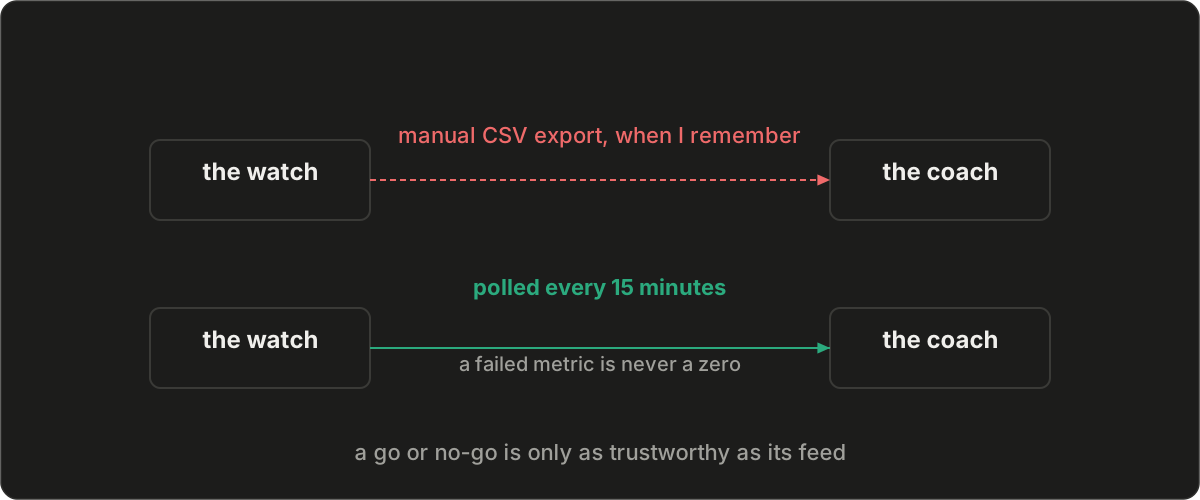
I built an AI marathon coach for my 2026 NYC training block. The first version ran on manual data. I exported a CSV from Garmin Connect, uploaded it, and the coach scored my training load and recovery from that snapshot. It worked, but it had one fatal flaw for a daily-use tool: it was always stale, and keeping it fresh was my job.
A coach that only knows last week's runs cannot make today's call. So I replaced the manual export with a live integration that pulls my runs and my daily recovery signals from Garmin automatically.
The two feeds that drive a go or no-go#
Every fifteen minutes, a small service wakes up, talks to Garmin, and brings two kinds of data into the coach:
- Activities. Each run, with date, distance, duration, average and max heart rate, elevation, and cadence. From these the coach derives pace and training load.
- Daily wellness. Resting heart rate, heart rate variability, sleep duration and score, body battery, stress, and training readiness. These are the recovery signals that gate whether a hard session is a good idea.
By the time I open the dashboard, the data is already there, without a manual export or upload.
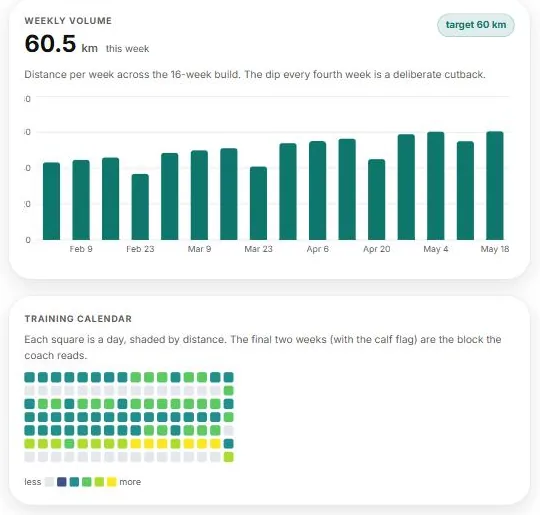
These are the same charts the real dashboard renders, shown here from the public demo with its sample athlete. The feeds above are what keep them current without my touching anything.
Why it mattered#
The coach makes go or no-go recommendations, and those are only as good as the freshness of the inputs. Recovery data in particular has a short shelf life. Last night's sleep and this morning's resting heart rate are the difference between "proceed with the tempo run" and "back off and recover." If I have to manually sync before every decision, I will skip it.
The deeper reason is trust. When the coach tells me to rest, I want to believe it acted on real, current data, not on a week-old snapshot I forgot to refresh. Automating the feed is what makes the recommendation credible enough to actually follow.
Designing for an API Garmin does not offer#
Garmin does not offer a simple personal data API for this kind of project. There is a partner program for companies, but nothing turnkey for an individual who just wants their own numbers. So the integration stands on two community libraries that do the hard part of talking to Garmin: garth for the Garmin SSO login and token refresh, and python-garminconnect for the activity and daily-wellness endpoints. Both speak to the same web endpoints the Garmin Connect site uses. It is an unofficial path, and I designed around that constraint deliberately.
A scheduled poller, not a webhook. Garmin does not push to me, so I pull. A scheduled job runs every fifteen minutes. It authenticates, lists recent activities, and writes any new ones to a database. A separate pass pulls the previous few finalized days of wellness data, because today's sleep and stress numbers are not complete until the day ends.
Reuse the session, do not re-login. Logging in to Garmin repeatedly is the fastest way to get rate limited or locked out. The poller authenticates once, stores the session securely, and reuses it on every subsequent run. Re-authentication only happens when the session expires. This single decision removed almost all of the flakiness from the integration.
def ensure_authenticated(self):
    # Resume the saved session instead of logging in on every poll.
    session = self.session_store.load(self.athlete_id)
    if session and not session.expired:
        return GarminConnect(session)
    # Only run the SSO login flow when the session is actually gone.
    client = GarminConnect.login(self.credentials())
    self.session_store.save(self.athlete_id, client.session)
    return client
A rolling lookback window, not a strict cursor. My instinct was to fetch only activities newer than the last successful poll. That dropped runs. A run often syncs from the watch to the Garmin cloud minutes or hours after it finished, so by the time it appears, the "last poll" watermark has already moved past it. The fix is to fetch a fixed recent window every time, at least the last several days, and deduplicate by Garmin's activity id. Slightly more work per poll, no lost runs.
def list_recent_activities(self, since, until):
    # A run can reach Garmin's cloud after the poll that follows it, so its
    # start time predates the "last sync" watermark. Filtering on
    # start_time > since would drop it forever. Fetch a fixed window and
    # dedupe by Garmin's activity id instead.
    lookback = timedelta(days=90) if since is None else timedelta(days=7)
    window_start = (until - lookback) if since is None else min(since, until - lookback)
    return client.get_activities_by_date(window_start.date(), until.date())
Never collapse a failure to zero. If a single wellness metric fails to load on a given day, that field stays empty rather than silently becoming a zero. A fake zero would poison every downstream calculation that reads it: training load, the acute to chronic workload ratio, the recommendation itself.
# One failed metric leaves that field None, never 0. A real-looking zero
# would poison load, the acute:chronic ratio, and the recommendation.
try:
    hrv = client.get_hrv_data(day)["hrvSummary"]["lastNightAvg"]
except Exception:
    hrv = None  # absent, not zero
Compute load at read time, from one formula. Training load is derived, not stored as ground truth. Whether a run came from the live poller or an old CSV import, the dashboard computes its load the same way when it renders. One formula, no drift between sources. This also meant that when I later fixed how load is computed, every run updated at once, with no backfill.
The bug that wasn't#
Recently a run looked missing on the dashboard and I braced for a pipeline bug. I compared two different Garmin endpoints directly, and both returned the same set the dashboard was already showing. The pipeline was faithful. The run was there the whole time. I had simply overlooked it.
That is worth admitting, because the reflex when data looks wrong is to assume the system is broken. Usually it is fine, and the real gap is visibility: I could not quickly see what I did and did not have. So the fix was not in the pipeline at all. I added a run log to the dashboard with a clickable calendar, so every day reads at a glance as either a run or clearly empty.
A pulled integration can only ever surface what the source actually has, so when something is missing from the source it usually points upstream, to a watch that has not finished syncing. But before blaming the platform, build the visibility to tell "never recorded" apart from "I just missed it." This time it was the second one.
Where the pieces came from#
If you want to build something similar, start with the two libraries that do the heavy lifting:
- garth by Matin Tamizi: the Garmin SSO login and OAuth token handling.
- python-garminconnect by cyberjunky: a clean wrapper over the activity and daily-wellness endpoints.
Both are community projects that reverse-engineer the same calls the Garmin Connect web app makes, so treat the surface as unofficial and subject to change. The acute to chronic workload ratio the coach computes on top of this data comes from the sports-science literature on training load and injury risk, which is the load metric most worth getting right. The snippets above are simplified for the post; the real code adds retries, audit logging, and per-metric error handling.
The coach is now reading my real training and recovery on its own, every fifteen minutes, all the way to the start line in November.