Lesson 3: Enforce Project Rules with Automated Checks
What you'll learn: write a script that detects a project-rule violation, run it through a Git pre-push hook, and test both rejection and success.
What you need: the specs/ directory from Lesson 1, at least one spec with a verify: line, a project with a Git remote, and your usual agent. The scripts use a POSIX shell, Git, grep, and sed; on Windows, use a compatible shell such as Git Bash.
Time: allow fifteen minutes for setup and about two per simple rule afterward. Cost: zero new dollars with your existing tools.
The idea#
Turn a repeated project rule into a script that exits nonzero when it detects a violation. Configure Git to run the script before pushing. When the hook runs and fails, Git stops that push.
A local hook is bypassable. git push --no-verify skips it, and each clone needs its own configuration. Its checks also have limited coverage: a filename check can reject .env without detecting secrets saved elsewhere. State the rule each script actually tests.
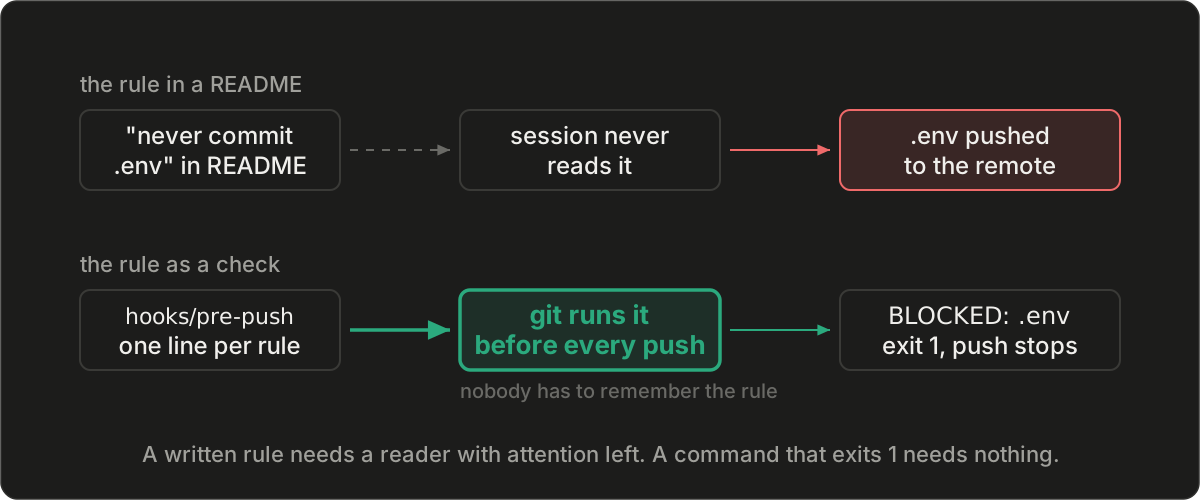
Why start here#
In July, I counted fourteen rules I had written over two months. One was enforced by a command. Start with a rule you repeatedly raise in review, then add a command for the acceptance checks in your in-progress specs. Written decisions still need judgment; automate the conditions you can evaluate directly.
The template#
Save this as hooks/pre-push, then run chmod +x hooks/pre-push and git config core.hooksPath hooks:
#!/bin/sh
# hooks/pre-push: git runs this before every push. One script per rule lives in checks/.
# A check fails by exiting non-zero; the first failure stops the push.
for check in checks/*.sh; do
  sh "$check" || { echo "BLOCKED by $check" >&2; exit 1; }
done
echo "all checks passed"
Save the first rule as checks/no-tracked-env.sh:
# Rule: never commit a .env file, not even in a commit a later one fixes.
if git ls-files | grep -qE '(^|/)\.env$' ||
   git log --branches --not --remotes --diff-filter=A --name-only --format= |
   grep -qE '(^|/)\.env$'; then
  echo ".env is in a commit about to be pushed; undo that commit, then re-commit" >&2
  echo "the other files by path: git reset HEAD~" >&2
  exit 1
fi
This checks paths named exactly .env in the tracked files and additions in local branch commits absent from known remote refs. It is not a general secret scanner or an exact reconstruction of the push payload.
Save this as checks/specs-verify.sh:
# Rule: every in-progress spec must pass its own verify command (Lesson 1).
[ -d specs ] || cd ..   # after Lesson 4's split, specs/ sits beside this repository
[ -d specs ] || { echo "no specs/ directory found" >&2; exit 1; }
for spec in $(grep -rl '^status: in-progress' specs --include='*.md'); do
  cmd=$(sed -n 's/^verify: *//p' "$spec" | sed 's/ *#.*//' | head -1)
  [ -n "$cmd" ] || { echo "$spec has no verify command" >&2; exit 1; }
  sh -c "$cmd" || { echo "$spec failed its verify command: $cmd" >&2; exit 1; }
done
This starter script expects the shown frontmatter layout and spec paths without spaces. Review every verify: command before running it; the script executes those commands through the shell. Confirm their working directory, particularly after the repository split in Lesson 4. If there are no matching in-progress specs, the loop runs no verification commands.
Add this to the file your agent reads at session start:
When I state a rule for the second time, write checks/<rule-name>.sh so it exits
non-zero when the rule is broken. Show me the check failing on a deliberate
violation, then passing after the fix, before you commit it.
Commit hooks/ and checks/ together. The files travel with a clone; the core.hooksPath setting does not. Configure it in each clone that should use the hook.
Each part, and the mistake it prevents#
The runner invokes each shell script in checks/ and stops at the first nonzero exit. Keep at least one check in the folder. Name each file for its rule so the directory listing identifies the available checks and Git history records their changes.
Git reads the exit code. A message that says “failed” while the script exits 0 allows the runner to continue. Include enough detail in the failure message to identify the violated rule and the correction needed.
The spec check rejects a missing specs/ directory or an in-progress spec with no verification command. A passing command establishes its own assertions. It does not establish untested acceptance criteria or that every relevant spec was selected.
Have the agent demonstrate failure and success before accepting a new check. Review both the rule it implements and where it runs. A script can be correct while the integration never invokes it.
A worked example#
A small site's specs/app/001-robots.md contains verify: test -f public/robots.txt. The required file is missing. In the recorded run, the push failed:
$ git push
specs/app/001-robots.md failed its verify command: test -f public/robots.txt
BLOCKED by checks/specs-verify.sh
error: failed to push some refs
After creating and committing the file, the next push printed all checks passed. A deliberate .env violation produced this result:
$ echo SECRET=1 > .env && git add -f .env && git commit -m "oops"
$ git push
.env is in a commit about to be pushed; undo that commit, then re-commit
the other files by path: git reset HEAD~
BLOCKED by checks/no-tracked-env.sh
error: failed to push some refs
I undid that commit as directed and pushed again. Across four pushes, two were blocked and two succeeded. The remote never received the .env file. These transcripts record that run; they do not verify a reader's installation. I also confirmed in the same run that --no-verify bypassed the hook.
When it grows#
Lesson 7 runs checks in continuous integration (CI), the automated jobs triggered by repository changes. The hosting platform can require successful checks before merge. This adds enforcement beyond a developer's local hook. Verify the job triggers, required-check settings, and bypass permissions; a workflow file alone does not establish that a merge will be rejected.
From the field#
In June, I wrote a check for a style rule I had repeated for weeks. I connected it to the tool my agents used and fed the script a sample payload. It refused the sample. Five weeks later, live sessions were still breaking the rule, and the check had never blocked one.
The sessions ran in a mode that ignored the signal the script used to refuse the action. My test exercised the script without checking how that mode handled its result. Reproducing the violation in a live session took one minute. Rewriting the check to refuse by exit code took ten more. The subsequent audit produced the fourteen-rules, one-enforced count.
Exercise#
Use a disposable project and test remote with dummy data. Copy the hook and two checks, make the hook executable, configure core.hooksPath, and add the standing instruction. Do not use real credentials for the .env example.
Give one spec status: in-progress and a verification command that currently fails. Attempt a push and confirm that the failure names the spec and command. Correct the condition and confirm that the next push reports success.
Give the agent your most-repeated rule and ask it to write the corresponding check. Introduce a known violation in a throwaway commit, attempt a push, and confirm that the new check blocks it. Undo the violation and confirm a successful push. Inspect the final branch to ensure the deliberate violation is gone.
You're done when#
You have observed two expected rejections through git push: one from spec verification and one from your rule check. Each failure identifies the cause, and each correction permits the push. Record the tested repository, check, command, and result.
A direct script run covers the script. The push exercise also covers Git invoking it in that clone. Neither observation proves that another clone, CI job, or merge rule is configured correctly. If the violation passes, inspect core.hooksPath, executable permissions, the selected checks, and their exit codes before continuing.
Common mistakes#
Deleting a committed secret in a later commit leaves it in earlier history. The example reads unpushed history for that reason. Rotate a real secret that has reached a remote.
Avoid adding many speculative rules before testing the first one. Repeat the integration test when the surrounding tool changes. Lesson 9 schedules a monthly drill for a selected check and records exactly which controls it exercises.
Further reading#
The Git hooks chapter covers hook points. The pre-commit framework supports shared check configuration. GitHub documents protected branches, and Claude Code documents hooks inside agent tool calls.
Next lesson#
Define Repository Boundaries and Isolate Agent Work assigns code ownership and separates concurrent edits into different checkouts.
Questions this post answers
- Why add automated checks when the project already has written rules?
- A script can detect a specified violation without depending on the agent remembering the rule while editing. When the local pre-push hook is installed, active, and not bypassed, a nonzero check result stops that push. It establishes only what the script checks.
- What should the first check enforce?
- Choose a repeated rule with a result a script can evaluate. This lesson checks for files named exactly .env among tracked files and added files in local branch commits absent from known remote refs. A second script runs the verify command of each in-progress spec. Neither check covers every possible defect or secret.
- How should I organize the checks?
- Keep one rule per script in checks/. Name each script for its rule and return a nonzero exit code when it fails. The pre-push hook runs the scripts in filename order and stops at the first failure. Keep the checks in version control and configure the hook in each clone.
- How do I test that a check blocks a push?
- Use a disposable project and test remote with dummy data. Introduce a known violation, attempt a push through the installed hook, confirm the expected rejection, then remove the violation and confirm success. A direct script test alone does not establish that Git runs it.
- Can a Git hook be bypassed?
- Yes. git push --no-verify skips the local pre-push hook, and another clone may not have the hook configured. CI checks and required merge rules add separate controls, but their effectiveness depends on configuration, permissions, and available bypasses.
Previous lesson: Lesson 2: Record Technical Decisions and Their Reasons