Lesson 1: Write Feature Specs Before Coding
What you'll learn: write a feature spec with observable requirements, explicit exclusions, and verification steps. Review it before asking an agent to implement it. What you need: a text editor and the AI coding agent you already use. No new tools. Time: allow fifteen minutes for setup and about ten per small feature. Cost: zero new dollars if your existing agent subscription covers the work.
My specs folder contains README.md to explain the project and layout, _template.md for the feature-spec form, and area folders such as app/ holding numbered specs like 001-short-name.md. I save a feature's requirements there before asking an agent to implement it, using the template and worked example below.
The idea#
A feature request in chat can omit details that matter during review. A later session may have the code without the original conversation. A spec gives both sessions the same requirements to consult.
Write one numbered file per feature. State what must be observably true, which files or systems are outside scope, and how to check the result. Have the agent draft it, correct the requirements yourself, and change its status from draft to ready before implementation. Review the finished work against each criterion.
The file preserves requirements and approval history. It cannot guarantee that the requirements are correct or that an agent follows them. You still need to inspect the evidence and resolve missing or contradictory results.
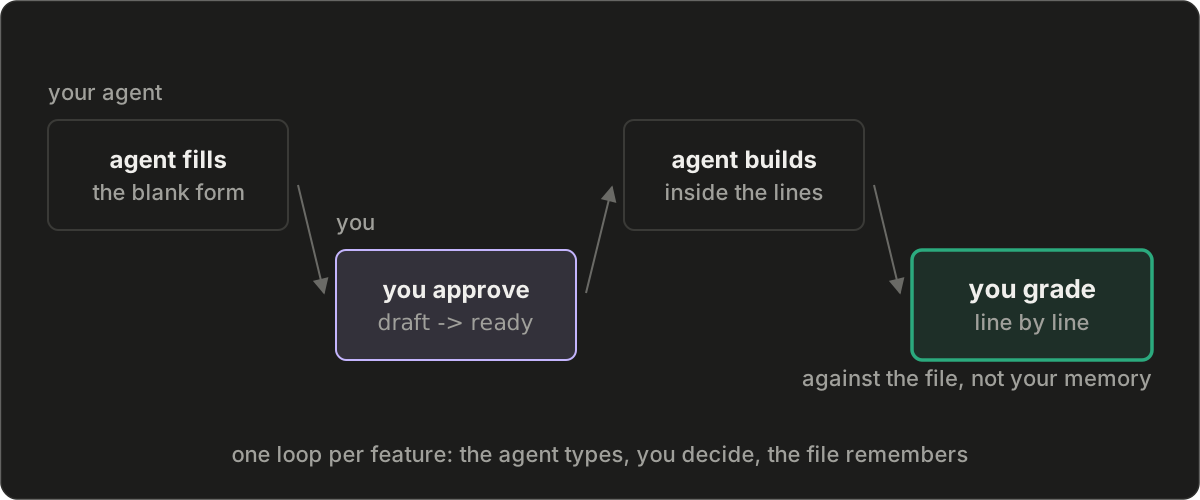
Why start here#
When I first published this lesson, I had built with AI daily for thirteen months across fifteen repositories, four public sites, and two dozen scheduled jobs. I struggled to retain the requirements across projects and sessions. Nine months in, I created a repository for specs. By the original publication, it had 1,867 commits since January, compared with 661 in my busiest code repository. The layout below reduces that setup to three initial files.
The template#
Create this directory:
specs/
  README.md          # the map: what this project is, where intent lives
  _template.md       # the blank form: every spec starts as a copy of it
  app/               # one folder per area of your project
    001-short-name.md
    002-...          # the record: what you meant, in order
Use a folder name that describes the area, such as app/, api/, or website/. Number specs within each folder in creation order. Start with one area and split it when that makes requirements easier to find. Point the agent at the relevant folder for each task.
Copy this into specs/_template.md:
---
status: draft          # draft -> ready -> in-progress -> completed
verify: npm test       # one command that must exit 0
---

# <feature name>

## Acceptance criteria
- [ ] <an observable state: a URL that loads, a file that
      exists, a number that appears somewhere it did not>
      check: <the command and its expected output, or the
      page and what it must show>

## Out of scope
- <paths, files, or systems this work must leave alone,
  named precisely enough to paste into a request>

## Notes (guidance, not binding)
<links, patterns worth copying, context the builder
might want>
Treat the acceptance criteria and exclusions as requirements. Keep optional suggestions in Notes so an implementation choice cannot silently become a requirement.
Add this instruction to the file your coding tool reads at session start, such as AGENTS.md or CLAUDE.md:
Before building anything new, copy specs/_template.md to
specs/<area>/<next-number>-<short-name>.md, fill it in from
what I have told you, and stop; only I move status from draft
to ready. Build only after that flip, and grade the finished
work against the file before telling me it is done.
Keep feature details in their spec files. The standing instruction tells the agent how to find and use them. Confirm that your tool actually loads that instruction in a new session; saving the file alone does not establish that it was read.
Each part, and the mistake it prevents#
The README needs three facts: what the project does, where its specs live, and how their numbers are assigned. A new session should be able to find the relevant feature without reconstructing your requirements from the implementation.
Each acceptance criterion describes an observable result. For example, “the endpoint returns the new response fields” gives a reviewer a result to check. “Refactor the handler” describes an activity and leaves the expected behavior unspecified. Name the command and expected output, or the page and what it must show.
The verify: command provides a repeatable check, but its coverage depends on what it runs. A file-existence test cannot establish that a page renders correctly. A passing test suite cannot establish an untested requirement. Use the check beside each criterion to record that distinction.
Out of scope names specific paths, files, or systems the task must leave alone. Review the diff against those exclusions. They are written instructions, with no filesystem enforcement of their own.
Status records progress through draft, ready, in-progress, and completed. Keep completed specs and their numbers so later changes can refer to the original requirements. If requirements change during implementation, review and record the change before grading the result against it.
A worked example#
This is a compressed version of the directory used for the series:
specs/
  README.md
  _template.md
  decision/                      # empty until lesson 2
  website/
    014-blog-series.md           # status: completed
    016-learning-series.md       # status: in-progress
The lesson's publication requirements used the template this way. Its status changed after the checks ran:
---
status: completed
verify: npm run check:content
---

# lesson-1-post

## Acceptance criteria
- [ ] the lesson page returns 200 on the live site
      check: open the URL after deploy, template visible
      in a code block
- [ ] the blog index lists it under the series title
      check: open /blog, entry present

## Out of scope
- every other post in the blog content folder
- the blog index layout
The two acceptance criteria require separate observations: the deployed lesson page and its entry on the blog index. The named content command covers its own assertions. It does not replace the post-deployment observations. The example is a historical publication record, not evidence that a current deployment has been checked.
From the field#
Earlier in the month of this lesson's original publication, I proposed removing an input from a scoring system I run. The initial analysis supported the change. An acceptance criterion written before that analysis required the improvement to hold on data the analysis had never seen. It did not hold, so the change never shipped.
Recording that condition early gave me a stated reason to reject a result I wanted to accept. It did not make the analysis correct by itself; the check still had to measure the proposed improvement on the specified data.
Exercise#
Create the directory, write the three README facts, and copy _template.md. Add the standing instruction to the file your agent reads at session start.
Choose the next small feature you plan to build. Give the agent the template and ask it to draft the spec from your request. Allow ten minutes for questions and edits. Check that every criterion names an observable result and that each exclusion identifies a concrete path or system. Change the status to ready when you approve it.
Ask the agent to implement the approved spec and include its exclusions in the request. Before accepting the work, run the verification command and inspect each criterion's evidence. Record whether each criterion passed, failed, or remains unverified. Resolve failures and evidence gaps before marking the spec completed.
You're done when#
You have one reviewed spec, an implementation checked against every criterion, and recorded results for those checks. You do not need to manufacture a failure. If a check fails, identify whether the implementation or the approved requirement needs correction.
Open a fresh session, point it at specs/, and ask what feature is approved next. Confirm that it finds the correct file and reports its status and requirements. That observation establishes that this session could retrieve the context. Repeat the check if you change how instructions or specs are loaded.
Common mistakes#
Avoid putting every feature in one growing file or copying all requirements into the standing instructions. Separate feature files are easier to select for a task. Keep the template short and add folders only when they improve retrieval.
Review agent-drafted requirements before implementation. A spec written after the code can describe the existing result without capturing what you originally needed. Keep approval with the owner and inspect the final diff for work outside the agreed scope.
Next lesson#
Record Technical Decisions and Their Reasons adds the rejected alternatives, accepted tradeoffs, and conditions for reconsidering a technical choice.
Questions this post answers
- What is the minimum useful structure for a spec directory?
- Start with specs/README.md to explain the project and file layout, specs/_template.md for the feature template, and one area folder containing numbered specs. Add folders when they help readers find the requirements for a particular part of the project.
- What belongs in a feature spec?
- Include its status, a verification command, observable acceptance criteria, a check for each criterion, and precise exclusions. Keep optional implementation suggestions in a separate Notes section. A passing command establishes only the conditions it checks.
- Who approves a spec drafted by an AI agent?
- The agent can draft the requirements and ask questions. In this workflow, the owner reviews them and changes the status from draft to ready. That is a written approval convention; the file itself cannot prevent an agent from changing the status or ignoring the requirements.
- How do I check that the spec directory is useful?
- Compare the implementation with each acceptance criterion and record its evidence. Then open a fresh agent session and ask it to find the next approved feature using the specs directory. This tests retrieval in that session, not compliance in every future session.
Keep reading
Lesson 2: Record Technical Decisions and Their Reasons
Write a decision record documenting what you chose, which alternatives you rejected, and when to reconsider. Instruct agents to read relevant decisions before proposing changes, then test whether they retrieve them.
Lesson 3: Enforce Project Rules with Automated Checks
Turn a project rule into a script that detects violations. Run it before each push and test it with a deliberately invalid change. Learn what a local Git hook checks and how it can be bypassed.
Spec-Driven Development and the Folder Architecture That Makes It Work
Why spec-driven development and structured folder architecture are the missing infrastructure for AI-assisted engineering: methodology, common mistakes, and where to start.
Watch the agent write
A polish agent drafts an essay against a pre-approved topic.
Lesson 9: Test Your Git Hooks, CI Checks, and Merge Rules
Run a monthly drill with a deliberate violation. Verify which controls reject it, report failures, and confirm cleanup. The drill attempts real merges, including an administrator override; use a disposable test repository and inspect the resulting evidence.
Lesson 8: Schedule Agent Runs and Configure Alerts
Run the task queue on a schedule. Separate urgent failures, requests for your decision, and routine logs. Detect missed runs, and understand why a watch on the same machine cannot detect that machine's complete failure.
Follow the work
New tools and writing as they ship — pick a channel.