Lesson 4: One home per stack
What you'll learn: how to lay out a project so an agent can be pointed at one part of it safely: one home per stack (infrastructure, logic, UI), one repository per home, and one skill file that makes every session name its home before it edits a file.
What you need: a project in one folder, git, the agent you already use, and the specs/ directory from Lesson 1 if you have one.
Time: an hour for the split, done once. Cost: zero new dollars.
The idea#
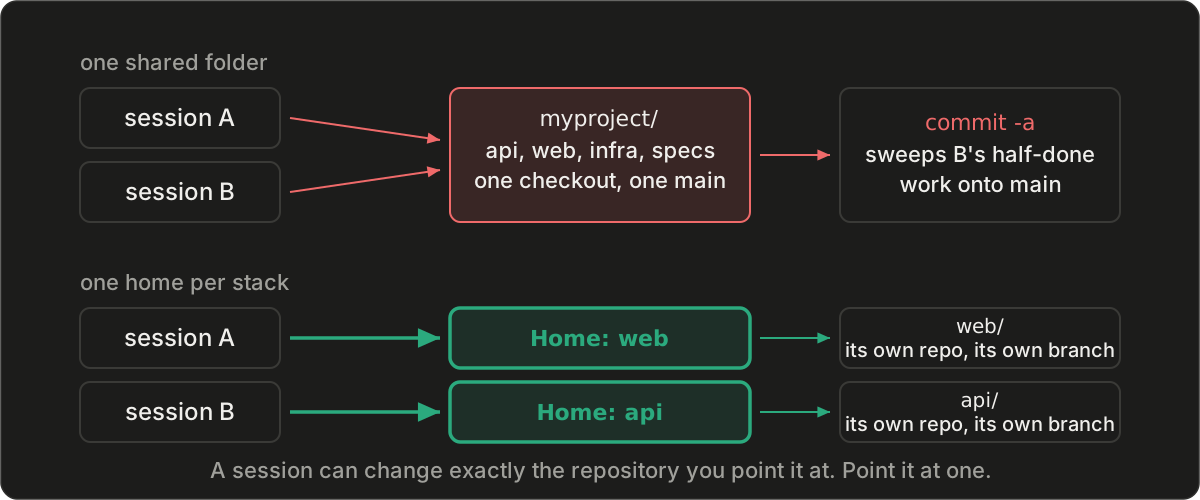
You asked for a change to one page and the diff came back touching the database layer, because nothing told the session where the page's home ended. Then two sessions ran at once in the same folder and one committed the other's half-finished work. Both failures have one cause: the boundary existed in your head and nowhere the agent could see it. A repository is the one boundary git records without being asked: a session pointed at one commits there and nowhere else. Git records the line, a short file makes the agent name which side of it a change is on, and a separate checkout per session keeps two of them from crossing it at once. So: one home per stack, each its own repository, and a file that tells every session which home a change belongs to.
Why start here#
Lessons 1 through 3 put specs, decisions, and checks in one specs/ directory, and that directory taught the rule: a folder earns its place the day two kinds of intent compete for one home. One level up, code earns its own repository the day it ships on its own schedule, or the day two sessions want the same checkout. Every later lesson assumes a session can be handed one repository and nothing else.
The template#
Four homes under one parent folder, each a repository:
myproject/
  specs/    # intent: specs, decisions, checks   (Lessons 1-3 live here)
  infra/    # what runs where: cloud resources, DNS, buckets
  api/      # logic: handlers, jobs, data
  web/      # UI: pages, styles, static files
  CLAUDE.md # or AGENTS.md: the standing file, one line added below
The standing file is the instruction file your agent reads at the start of every session, CLAUDE.md or AGENTS.md depending on the tool. The skill file, saved as .claude/skills/layout/SKILL.md in the parent folder (or pasted into AGENTS.md if your tool has no skills):
---
name: layout
description: Where each kind of change lives in this project, and the rule for working in exactly one home per change. Read before touching any file.
---

# Layout: one home per stack

| Home | Holds | Own repository | Ships by |
|---|---|---|---|
| `specs/` | intent: specs, decisions, checks | yes | nothing; every session reads it |
| `infra/` | what runs where: cloud resources, DNS, buckets | yes | the infra deploy command |
| `api/` | logic: handlers, jobs, data | yes | the api pipeline |
| `web/` | UI: pages, styles, static files | yes | the web pipeline |

## Routing rule
1. Read the standing file and the spec first. Before editing any file, name the home this change lives in, on one line: `Home: web`.
2. Edit only inside that home. If the change needs two homes, stop and say so; it is two changes, and the spec comes first.
3. Cite the spec the change serves. Build what its acceptance criteria say; change nothing listed under its Out of scope.

## Git rules (each home is its own repository)
- One session per checkout. A second session gets its own clone of the home; branches alone do not separate working files.
- Start from a fresh branch off that home's main. Never commit on main.
- Commit only the files you changed, by path. Never `git commit -a` or `git add -A`.
- Leave untracked files you did not create alone unless the change needs them; they may be someone else's work in progress.
- If the home has a remote, push the branch before reporting done; otherwise say the commit is local only.
- One commit never spans two repositories.
The standing-file line:
Read the layout skill before touching any file, and follow its routing and git rules.
Each part, and the mistake it prevents#
The "Ships by" column is the tell: two rows that ship by the same command on the same schedule may be one home; one row that ships by two commands is two.
specs/ as its own repository keeps intent separate from code. A spec beside the code it governs gets edited in the same commit, and then it describes what was built rather than what was meant.
A session that writes Home: web before it edits a file has scoped itself, and you can grade the diff against that line. The second line stops the page change from reaching the database: two homes, two changes, spec first.
Each git rule answers a failure I have seen. One session per checkout, because two sessions in one folder see each other's half-finished files, and a branch does not change that. Fresh branch, because main is what deploys. Paths not -a, because a bulk commit takes whatever is dirty, including work that is not yours; untracked files alone, for the same reason. Push before reporting done, because a folder nobody has pushed from is one a cleanup job can delete. One commit per repository, because a change that spans two cannot be reviewed or reverted as one.
The standing-file line is what makes the agent read the skill; a skill nobody is told to read is a README.
A worked example#
The scratch project above, with one spec numbered the Lesson 1 way, specs/web/001-robots.md, whose acceptance line says web/public/robots.txt exists and disallows /admin, and whose Out of scope lists api/ and infra/. The scratch homes had no remotes. A fresh session, given only the standing file and "implement specs/web/001-robots.md, commit on a branch":
Home: web, per specs/web/001-robots.md, this only touches
web/public/robots.txt.
...
Done. Created web/public/robots.txt (disallows /admin) on branch
add-robots-txt in the web repo, committed as ff93e65. Both acceptance
checks from specs/web/001-robots.md pass. No remote is configured for
web, so this commit is local only.
The first line came before the first file was edited. Afterward, specs/, infra/, and api/ were clean and on main. A second run asked for a health endpoint in the api plus a status dot on the web homepage, with no spec, and the session stopped: "your request touches two homes, and per the routing rule that is two changes, and the spec comes first." All four repositories were untouched.
How it scales#
The parent folder is a convenience, not a repository; it holds homes and the skill file. When a home grows two kinds of code that ship separately, it splits and the table gains a row; the routing rule does not change. The platform this series comes from is fourteen repositories under one folder today, and the routing rule is still one line. The one layout the table forbids is several homes sharing a single checkout.
Who does the work: you name the seams and approve each later split. The agent moves the files, runs git init in each home, writes the first commit in each, and fills the table. From then on it names the home for every change and you read that line before the diff.
From the field#
On June 29 a formatting sweep in a second session ran git commit -a in the backend checkout I was also working in. It picked up the tracked edits from my half-finished feature, an import, and committed them to main without the new module files they pointed at, because those were untracked. Main now raised an import error on load, and the next deploy would have shipped it to twenty-odd functions. The fix was a small pull request removing the orphaned import. Two sessions had shared one checkout, and one of them had done what git makes easy. Every feature since then has been built in its own checkout off main, and the git rules above are the rest of that afternoon written down.
Exercise#
- Save the skill file and add the standing line.
- Tell the agent the seams: which folders are infra, logic, and UI. It proposes the table; you correct the rows.
- Back up the project. Have the agent move the files into the four homes, run
git initin each, and make one commit per home namedinit <home>. Each home starts with fresh history; ask forgit filter-repoif you want the old history carried over. No commit spans two homes. - Move
specs/into its own home the same way. It keeps its numbers. - Pick one ready spec whose Out of scope names the other homes. Open a fresh session with the standing file only, and ask for the change.
- Read the first line the session writes. Then read the diff.
You're done when#
The session named the home before it edited a file, the diff stayed inside that one repository, and the other homes are clean and on main afterward. Two results fall short: the change was right but the home was never named, which means the skill was not in front of the session; or one commit touched two homes, even if both halves were right. Then ask for something that needs two homes and confirm it stops.
Common mistakes#
- Splitting by file type instead of by ship schedule.
- A parent-folder repository wrapping the homes. Then the parent is the shared checkout again.
- Two sessions in one checkout at once. Each gets its own clone and branch.
An hour once, and zero new dollars; from then on every change costs the reader one line, Home: web, before the diff.
Further reading#
Martin Fowler's Bounded Context is the same boundary idea from the modeling side. Parnas's 1972 paper On the Criteria To Be Used in Decomposing Systems into Modules is the classic argument for splitting by what changes together. The Claude Code skills reference is the file format above; the AGENTS.md convention covers other tools.
Next lesson#
What the agent may do without asking, what it must ask before, and what done means: one standing file instead of a permission prompt per task.
Questions this post answers
- Why split a small project into several repositories just to use AI coding agents?
- Because a session pointed at one repository commits there and nowhere else, and a diff you can review is the boundary you can enforce. In one folder, a session asked to change a page can touch the database code, and two sessions working at once can commit over each other. One repository per stack, one session per checkout, and a rule to name the home first turn the boundary into a habit instead of a hope.
- What are the homes in a one-person project?
- Four to start: specs (intent), infra (what runs where), api (logic), and web (the UI). Each is its own git repository under one parent folder. A home earns its place the day it would ship on a different schedule, or the day two sessions want the same checkout.
- How does an agent know which repository to work in?
- A short skill file lists the homes and one rule: name the home this change lives in before editing any file, edit only there, and stop if the change needs two homes. A line in the standing file makes every session read it first.
- Who does the splitting?
- You name the seams; the agent moves the files, initializes each repository, and writes the first commit in each. The skill file is the one artifact you write by hand, and it is under thirty lines.
Keep reading
Watch the agent write
A polish agent drafts an essay against a pre-approved topic.
Lesson 3: The check that fails
Third lesson in a series on running an AI-powered software team of one. A rule you write in a README gets broken by the first session that never reads it. A folder of one-script checks, run by git before every push, turns your most-repeated rule and the verify line from Lesson 1 into commands that fail. Your agent writes each check; you watch it fail once.
Lesson 2: The decision record
Second lesson in a series on running an AI-powered software team of one. A fresh agent session cannot see what you rejected, so it proposes it again. One page per settled choice, an index, and one standing line make every session read your decisions before it touches the code. Template, index, worked example, and a fresh-session test.
Seven articles to a platform that improves itself
The full path to an agent platform that edits its own instructions is already published, scattered across seven articles that never mention each other. I run that architecture as one person: supervisor and worker tiers, verification guards, external memory, a work queue, and a weekly pass that sweeps corrections back into the instruction files. Here is the platform, layer by layer, with the article that teaches each layer.
Lesson 1: The spec directory
First lesson in a series on running an AI-powered software team of one. Before you ask an agent to build, give your project a home for intent: a small directory of numbered specs grown from one template your agent fills in and you approve. Directory skeleton, spec template, worked example, and a fifteen-minute exercise included.
When your method repo and your product repo don't talk to each other
I built a method as a public repo and the product that runs it as two private ones, and none of them treated the others as a source of truth. The domain enum lived in four places. A persona drifted between its lens file and its API contract. Here is what that cost, and the one structural change that turned the whole class of bug into a failing test.
Follow the work
New tools and writing as they ship — pick a channel.